Load the context
A daily schedule starts downloads of the base resume and cover letter from Drive. PDF text extraction prepares the reference material.
n8n × APIFY × OPENAI × GOOGLE WORKSPACE
A workflow that turns scattered LinkedIn listings into a focused application queue—with fit assessments and tailored documents ready for a human review.
Try the interactive demo ↘LINKEDIN JOB TRACKER
& APPLICATION TAILOR
Find. Assess.
Tailor. Review.
01 / THE PROBLEM
Discovering roles, spotting duplicates, comparing requirements, and rewriting application materials can fragment a job search. This project brings those steps into one repeatable n8n pipeline, with Google Sheets as the working queue.
The goal: keep the candidate focused on deciding where to apply and reviewing the evidence behind each recommendation.
02 / EXPLORE THE EXPERIENCE
Fictional jobs, scores, and document excerpts. Runs in your browser; no live LinkedIn, AI, or Google Sheets requests. No applications are submitted.
Ready to explore. Run the demo to process one sample job.
03 / UNDER THE HOOD
Based on the supplied n8n export. The demo condenses the node graph into five readable stages.
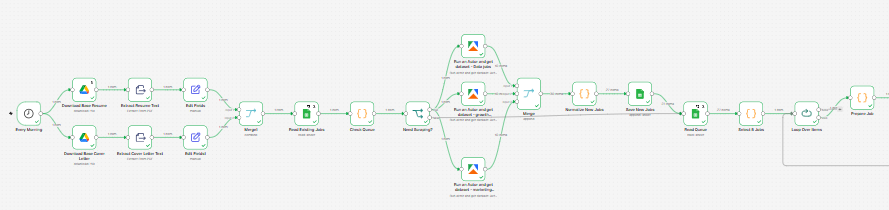
Load the resume and cover letter, check ExistingJobs, and branch into three LinkedIn searches when the queue needs replenishing. Normalize the results, save new jobs, and pass a queued job into the application loop.
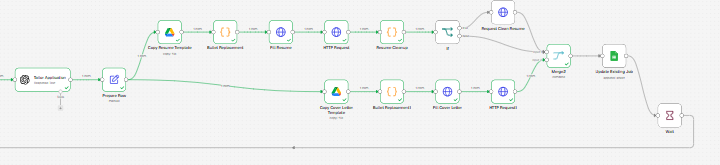
Prepare the AI output, copy and fill separate Google Docs templates, clean up the resume, then merge both document branches. Write the application details to ExistingJobs and return to the loop after a wait.
Original workflow screenshots supplied for this project. Open either image for a closer view; node labels are limited by the resolution of the source captures. The interactive shortlist above uses fictional sample data.
A daily schedule starts downloads of the base resume and cover letter from Drive. PDF text extraction prepares the reference material.
Read ExistingJobs. When no non-applied jobs remain, run three Apify searches: junior data, marketing analyst, and growth marketing in Greater Vancouver.
Standardize fields, remove URL tracking parameters, and compare LinkedIn IDs and URLs with saved jobs. Keep up to 30 new records and select one queued job per run.
Ask OpenAI for a structured fit assessment and tailored content grounded in the base resume. Copy Google Docs templates, replace fields, and clean up unused resume content.
Append the score, rationale, document links, and “To review” status to ExistingJobs. A score of at least 70 sets an application-priority flag in the preparation step.
*07:00 is the trigger hour in the export; the active workflow timezone and successful scheduled execution have not been verified.
04 / DESIGN DECISIONS
Fit scores help prioritize attention. They are evidence-based estimates, not interview probabilities. Every generated application still needs a candidate’s review.
The AI prompt restricts candidate claims to the base resume and treats job descriptions as reference data. This is a prompt constraint, not a guarantee of factual accuracy.
The prompt specifies experience (40), skills and tools (30), seniority (20), and education (10), with missing evidence treated as unverified.
Google Docs copies provide the output structure; replacement and cleanup steps insert the tailored text before saving links to the tracker.
IMPLEMENTATION NOTES / CURRENT EXPORT
The exported “Select 5 Jobs” node uses slice(0, 1). “Update Existing Job” uses an append operation, so processing adds a review row rather than updating the original. Queue checks exclude only “applied” rows, which can allow a pending or review job to be selected again.
Before a production rollout: update rows by job ID, distinguish processed jobs from pending jobs, reconcile conflicting output-schema instructions, and validate complete runs. The export references ExistingJobs; it does not include a write to the separate Dashboard sheet. No live execution results or time-saving metrics are claimed here.
RESEARCH → WORKFLOW → REVIEW